That just hasn’t happened with Windows touch screens.
Yes, Microsoft did fuck around and find out with Windows 8, but by the time Windows 10 landed an entire decade ago, this whole issue has been completely settled. That’s right, your Windows/Linux user friends have been using touchscreens (or no touch screens) without issue for a decade. No UX sky has fallen in this regard.
There’s absolutely zero downside to having a touch screen on Windows and you also absolutely don’t need a touch screen to use it.
I’m using a touch screen on my Linux laptop right now and it’s great. I don’t have to use it. The screen being touch didn’t cost me extra money. It’s just there if I want it.
The Apple camp seems to believe that every technology included with a product must have some kind of intentional holistic value. Apple removed the USB-A port because USB-C is the future. Apple removed the escape key and the function keys because the Touch Bar would replace it.
But the truth of the matter is, sometimes the option to just include both isn’t some kind of magical barrier that Apple can’t do.
You go out and buy a ThinkPad X9 15p and it has 3x thunderbolt, HDMI, SD card, and USB-A. Why doesn’t a MacBook Pro include USB-A? Well, remember, USB-A is the past! It’s legacy!
But the thing about it being unnecessary doesn’t change the fact that it remains trivially expensive to include, and it comes in handy for a bunch of peripherals that aren’t even that old.
So, I think this is why everyone assumes that Apple is going to destroy the OS because of some new thing they add to the hardware. Because the Apple cult is all about the mythical finely crafted experience. If you don’t do things the Apple way you’re holding it wrong. but in Microsoft/Linux-land, they don’t really care. Linux is fully free, and Microsoft knows their demographic net is too wide and their marketshare is too high that they can’t dictate form factor, choice of peripherals, etc. Their whole philosophy is that Windows is suitable for anything and everything.
The Apple culture can’t contemplate a technology company just including an extra option for users with no specific intended use case. PC manufacturers include a touch screen because, screw it, it only costs a few cents extra and maybe someone might like it, software integration be damned/that’s not our problem.
[–] ndiddy 1 day ago
[–] Grombobulous 1 day ago
This is even true with laptops since bezels have dramatically shrunk in size.
[–] wolrah 1 day ago
[–] Grombobulous 19 hours ago
I've heard a lot of complaints about the Settings app being a downgrade from Control Panel and being too padded or whatnot, but let's not forget that the old Windows XP era Control Panel couldn't even be maximized. It was just one size no matter what.
[–] CountSessine 1 day ago
We forget this because Windows 7 was ugly and Windows 10 and 11 are nicer looking and that feels like progress, somehow. But you don't get nearly the functional information density with Windows 11 that you did with 7.
[–] Grombobulous 1 day ago
The taskbar icons are the exact same size. The tray icons are the exact same size. I’m struggling to figure out what’s different.
I personally use KDE which you can fully customize in terms of sizing, it’s great on a touch screen.
[–] troupo 1 day ago
[–] Grombobulous 1 day ago
I still don’t really see the information density problem. You can fully customize the OS scaling way more than you ever could with older OS versions. Again, things like windows task bar icons and tray icons are the exact same size as Windows 7. Yeah they’re bigger than Windows 95 but I only had 800x600 to work with in those days.
[–] troupo 1 day ago
No, we didn't. And yet we didn't have to scroll through a settings list with 10 elements.
And no, information density isn't "make everything smaller". It's "use space on screen efficiently".
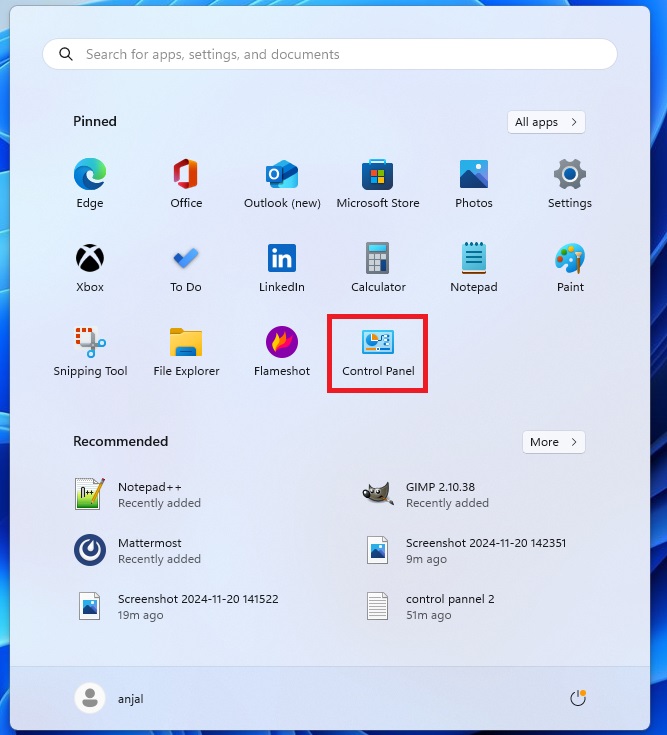
For example, "modern" startup menu shows fewer items on an area 10x larger than the entire screen available to win95. And no amount of scaling can fix that. And this permeates the entire OS: https://www.buildwindows.com/wp-content/uploads/2024/11/4-4.... vs https://pbs.twimg.com/media/HBTFbzlXwAA5OwD.jpg

[–] Grombobulous 19 hours ago
Do I need to see a list of every single application on my computer (utilitarian) or do I need to see the applications I use the most and added most recently (functional)?
The "list every application ever" paradigm predated search indexing. There was no alternative to an alphabetical list of every installed application. On a desktop/laptop computer, I spend entire days without using the Start Menu/macOS Dock/Application Launcher (KDE's "start menu") as an actual method to launch programs. I'm hitting Command/Alt + Space or the Windows key and typing in the first letter or two of the program I'm trying to launch.
Information density was also a necessity of the era, not a design preference. You and I might prefer information density as power user coders or what have you. Do my parents prefer information density? Nope!
I would agree with you more broadly that the Windows 11 Start Menu isn't really a great design but I can see what they were going for. The execution isn't there but I think the overall idea makes sense.
We can also have the rose tinted glasses about Windows 95 with the cascading menus but it was really clunky when your application list gets really long or you have a lot of nested folders. It was easy to accidentally misclick or lose your sub-folder.
E.g., in that screenshot you posted, if I hovered my mouse over "Kids Choice" and wanted to get to a program inside there, but then I accidentally moved my mouse over "Visio Home SE" and lost the "Kids Choice" submenu selection, then I have to bring my mouse back to find it again.
[–] troupo 16 hours ago
No. The comparison I'm making is non-functional design vs. functional design.
Modern "designers" wouldn't know functional design if it hit them in the face and couldn't design one if their life depended on it.
> Do I need to see a list of every single application on my computer (utilitarian) or do I need to see the applications I use the most and added most recently (functional)?
Again, you're completely missing the meat of my argument while focusing on superficial.
The meat is: why the hell our huge 5k monitors manage to show less information on screen than 600x400 14" monitors of 30 years ago?
Your answer is "but scaling". No, scaling doesn't solve the issue. At best in modern designs you will see 11 items instead of 10. Where there's space for 50.
I wasn't saying that Win95 start menu was perfect. I was saying: modern start menu manages to show less information, and more poorly[1], on an area that is 10x the size of the entire screen available to Win95. And that this issue is repeated through the entire design of the OS.
[1] not to say more slowly, but that is an additional can of worms
[–] internet2000 1 day ago
[–] Grombobulous 18 hours ago
Back in the day, if 1% of Apple users wanted a touch screen, Steve Jobs could say "we're not focusing on that."
Today, 1% of Apple's install base (if we include iOS and iPadOS) is hundreds of millions of people.
[–] kccqzy 1 day ago
[–] tonymet 1 day ago
Windows laptops never expected tough screen adoption to hit 90% and still touch degraded the experience.
The worry here is that with Apple's e2e design control over the Mac, that this pivot will mean our MacOS UX will be removed in lieu of a more iPad-like experience.
Just look at other developer-friendly features like unlocked bootloaders, background jobs, unsigned software that Apple has removed from their hardware .
So this is a big deal and significant. It's different than you running Linux on your Windows laptop because the touch experience there never had a chance to push out the traditional UX.
[–] Grombobulous 1 day ago
Windows laptops have been majority touch screen for a long time, so in theory this touch experience could have pushed out the traditional windows experience more. With the exception of the repressed memories of Windows 8, it just hasn’t happened. Despite most Windows laptops coming with touch screens, the interface is very much mouse and keyboard oriented.
But also, Apple still can’t make Mac mini or Mac Studio users use a touch screen.
In theory the iMac could gain a touch screen, the Studio Display could gain one, but I think that’s very fundamentally different ergonomic situation than a laptop.
When I’m at a desk like a coffee shop I can rest my arm on the table and scroll the browser with my thumb at the lowest part of the screen very easily on a laptop. A desktop computer screen is a lot different than that, usually sitting higher and further away, so I still think every desktop Apple sells will stick with non-touch for the foreseeable future.
Perhaps the strongest indicator is just that Apple has Microsoft as a case study. Everyone saw what happened with Windows 8 and knows not to repeat that sort of debacle.
Finally, I have to imagine that software development tools are much better now where it’s easier to make dynamic interfaces where user preference can rule the day.
Macs had managed to avoid this degradation for a while because they didn't have touchscreens, but Apple put in the giant finger-friendly padding regions as part of the UI changes in Tahoe, which got a lot of negative feedback. Now that they're introducing touchscreen laptops, it's unlikely that they'll ever fully revert those changes since it will make the touch experience worse.